

API Security Best Practices: Secure APIs & Fix Errors
Last year I watched a small startup lose a weekend to a single unprotected endpoint. No hack movie drama, no hooded villain. Someone simply found /api/users?limit=100000, noticed there was no rate limit, and downloaded the whole user table. The fix took ten minutes. The cleanup took three weeks.
That story is why API security deserves more attention than it gets. APIs are now the front door of almost every web and mobile product, and attackers know it. In this guide I’ll walk through how to secure your APIs properly, and then how to debug the errors that show up when something breaks. The examples use Node.js and Express, but the ideas apply to any stack.
What Is API Security (and Why It Breaks So Often)?
API security is the set of practices that make sure only the right people, apps and services can call your API, and that they can only do what they are allowed to do. It covers authentication, authorization, input validation, encryption, rate limiting and monitoring.
Why do APIs break so often? Because they are built fast, exposed directly to the internet, and tested mostly on the “happy path”. The OWASP API Security Top 10 keeps listing the same culprits year after year: broken object-level authorization, broken authentication, excessive data exposure and missing rate limits. None of these are exotic. They are simple things we forget to do.
Think in Layers, Not in Single Fixes
No single tool makes an API secure. Good teams stack small defences so that when one fails, the next one catches the problem.
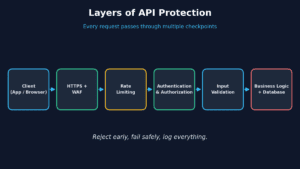
Let’s go through each layer with practical code.
1. Use HTTPS Everywhere
This one is non-negotiable. Without TLS, tokens and passwords travel in plain text. Redirect all HTTP traffic to HTTPS and add the HSTS header so browsers never try the insecure version again.
import helmet from "helmet";

app.use(helmet());               // sets HSTS, X-Content-Type-Options and more
app.disable("x-powered-by");     // don't advertise your stack
2. Authenticate Properly (and Authorize Every Request)
Authentication answers “who are you?”. Authorization answers “are you allowed to do this?”. Many breaches happen because teams build the first and forget the second.
For most modern apps, short-lived JWT access tokens or OAuth 2.0 are a solid choice. A few rules I follow:
- Keep access tokens short-lived (10 to 15 minutes) and use refresh tokens for longer sessions.
- Store secrets in environment variables or a secret manager, never in Git.
- Always verify the token signature and expiry on the server.
- Never trust an ID sent by the client without checking that the user owns that resource.
import jwt from "jsonwebtoken";

export function requireAuth(req, res, next) {
  const header = req.headers.authorization || "";
  const token = header.startsWith("Bearer ") ? header.slice(7) : null;
  if (!token) return res.status(401).json({ error: "Missing token" });

  try {
    req.user = jwt.verify(token, process.env.JWT_SECRET);
    next();
  } catch {
    res.status(401).json({ error: "Invalid or expired token" });
  }
}

// Authorization: the user may only read their own order
app.get("/api/orders/:id", requireAuth, async (req, res) => {
  const order = await Order.findById(req.params.id);
  if (!order) return res.status(404).json({ error: "Not found" });
  if (order.userId !== req.user.id) {
    return res.status(403).json({ error: "Forbidden" });
  }
  res.json(order);
});
That last check is the one that prevents the classic “change the ID in the URL and see someone else’s data” attack (BOLA/IDOR).
3. Add Rate Limiting
Rate limiting protects you from brute-force logins, scraping and accidental traffic floods. Be stricter on sensitive routes such as login and password reset.
import rateLimit from "express-rate-limit";

const apiLimiter = rateLimit({ windowMs: 15 * 60 * 1000, limit: 100 });
const loginLimiter = rateLimit({ windowMs: 15 * 60 * 1000, limit: 5 });

app.use("/api/", apiLimiter);
app.use("/api/login", loginLimiter);
4. Validate Every Input
Treat all incoming data as hostile until proven otherwise: body, query string, headers, even file names. Validate type, length and format, and reject anything unexpected. A schema library makes this painless.
import { z } from "zod";

const createUser = z.object({
  email: z.string().email(),
  name: z.string().min(2).max(60),
});

app.post("/api/users", (req, res) => {
  const result = createUser.safeParse(req.body);
  if (!result.success) {
    return res.status(400).json({ error: "Invalid input" });
  }
  // safe to use result.data
});
Pair this with parameterized queries or an ORM so user input never gets glued into raw SQL.
5. Return Only What the Client Needs
Do not return the full database object and hope the frontend ignores the sensitive parts. Password hashes, internal IDs and admin flags have leaked this way many times. Build explicit response shapes, and always paginate list endpoints with a hard maximum for limit.
6. Lock Down CORS and Log Smartly
Do not use Access-Control-Allow-Origin: * on APIs that use cookies or private data. Allow only the domains you actually own. And log enough to investigate incidents (timestamp, user ID, route, status, request ID) without ever logging passwords, tokens or card numbers.
Quick API Security Checklist
- HTTPS enforced, HSTS enabled
- Short-lived tokens, secrets outside the codebase
- Ownership check on every resource
- Rate limits, with stricter ones on login
- Schema validation on all inputs
- Minimal responses, paginated lists
- Strict CORS, safe logging, dependencies updated
How to Fix Common API Errors
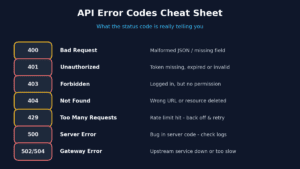
Even a well-secured API throws errors. The skill is reading them calmly instead of changing random things. The HTTP status code is your first clue.
401 Unauthorized
Meaning: the server doesn’t know who you are. Usual causes: missing Authorization header, expired token, wrong secret between environments. Fix: print the decoded token’s exp time, check that the header format is exactly Bearer <token>, and make sure production and local use the same signing secret where they should.
403 Forbidden
Meaning: the server knows you, but you lack permission. Fix: check the user’s role or scope, and your ownership logic. If it only fails in the browser, look at CORS too.
400 Bad Request
Usual causes: invalid JSON, a missing Content-Type: application/json header, or failed validation. Fix: return a clear message about which field failed, and confirm the client is really sending what you think it is.
429 Too Many Requests
You hit a rate limit. Read the Retry-After header and use exponential backoff on the client:
async function fetchWithRetry(url, options, retries = 3) {
  for (let i = 0; i <= retries; i++) {
    const res = await fetch(url, options);
    if (res.status !== 429) return res;
    const wait = Number(res.headers.get("Retry-After")) || 2 ** i;
    await new Promise(r => setTimeout(r, wait * 1000));
  }
  throw new Error("Rate limit: retries exhausted");
}
500, 502 and 504 Errors
A 500 means your server code crashed, so go to the logs and find the stack trace. A 502 or 504 usually means a proxy (Nginx, a load balancer, a serverless gateway) couldn’t get a timely answer from your app. Check that the app is running, that the port matches, and that timeouts are realistic. Wrap async handlers in proper error handling so one bad request doesn’t take the process down:
app.use((err, req, res, next) => {
  console.error({ id: req.id, path: req.path, err });
  res.status(500).json({ error: "Something went wrong" }); // no stack trace to client
});
CORS Errors in the Browser
If the console says the request “has been blocked by CORS policy”, the bug is almost always on the server. Add your frontend origin to the allowed list, and remember that preflight OPTIONS requests must also return the right headers.
A Debugging Workflow That Actually Works
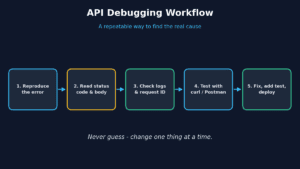
- Reproduce it. If you can’t trigger the error on demand, you can’t confirm the fix.
- Read the status code and response body. Don’t skip the body; it often names the exact problem.
- Check the logs using a request ID. Add one to every request so you can trace it end to end.
- Test outside your app with
curlor Postman. That tells you whether the bug is in the API or the client. - Fix, add a test, deploy. A bug without a test comes back.
curl -i -X GET https://api.example.com/orders/42 \
  -H "Authorization: Bearer YOUR_TOKEN" \
  -H "Accept: application/json"
The one habit that saves the most time: change one thing at a time. If you change three things and it starts working, you’ve learned nothing.
Frequently Asked Questions
What is the most important API security practice?
If I had to pick one, it’s authorization on every request: checking that the logged-in user actually owns or may access the resource. Broken authorization is the top API vulnerability in the OWASP list.
Are API keys enough to secure an API?
No. API keys identify an application, but they are easy to leak and don’t identify the user. Use them for basic tracking, and add OAuth 2.0 or JWT-based authentication for anything sensitive.
What is the difference between 401 and 403?
401 means “I don’t know who you are” (authentication failed). 403 means “I know who you are, but you can’t do this” (authorization failed).
How often should I rotate API secrets?
Rotate them on a schedule (every 90 days is common) and immediately if you suspect a leak. Use a secret manager so rotation doesn’t require a code change.
How can I test my API for security problems?
Combine automated scans (OWASP ZAP, dependency audits like npm audit) with manual checks of authorization logic. Run them in CI so every release gets tested.
Final Thoughts
Securing an API isn’t about one clever trick. It’s about layers: HTTPS, solid authentication, strict authorization, rate limits, validation and honest logging. And when errors appear, a calm, repeatable debugging routine beats guesswork every time.
Start small. Pick the checklist above, find the one item your API is missing today, and fix that this week. If you found this useful, check out our other guides on backend development and DevOps, and share it with a teammate who ships APIs.