


Deconstructing Kubernetes Pod ‘Pending’ States: Infrastructure Triage and Fixes
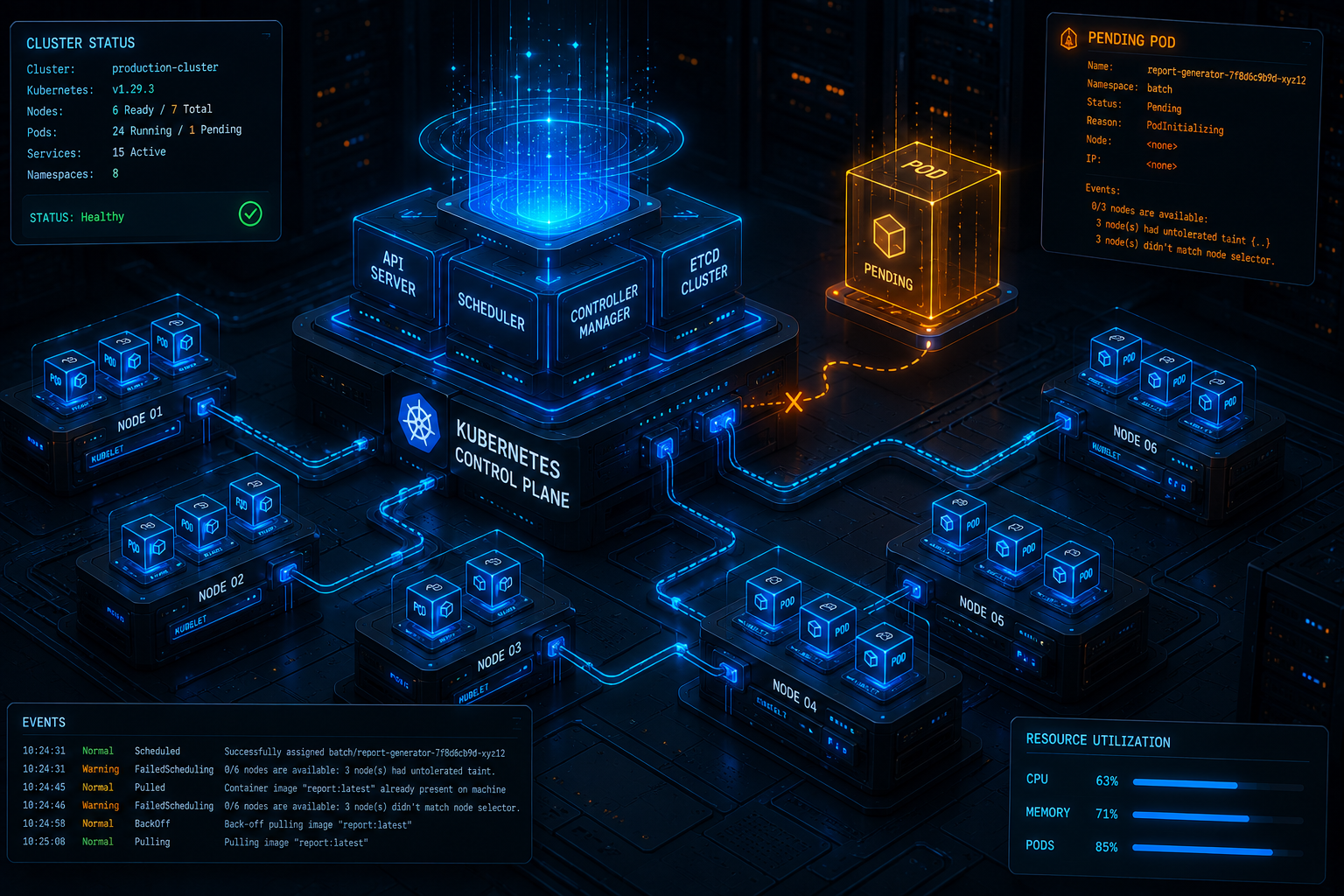
Deploying microservices to a Kubernetes (K8s) cluster provides unparalleled scalability and container orchestration. However, when a rolling deployment stalls and your pods get stuck indefinitely in the Pending state, your continuous deployment pipeline grinds to an immediate halt. Unlike runtime execution failures like CrashLoopBackOff or ImagePullBackOff, a Pending state indicates that the Kubernetes scheduler (kube-scheduler) has completely failed to assign the pod to a valid node within the cluster.
To build a resilient delivery pipeline, platform engineers must step away from application logs and look directly into cluster orchestration mechanics. Let’s diagnose the three primary architectural root causes behind pending pods: resource starvation, scheduling constraints, and persistent storage topology binding failures.
1. Resource Starvation: CPU and Memory Request Exhaustion
The most frequent trigger for an indefinite Pending state is that the resource requests specified in the pod deployment manifest exceed the available allocatable capacity of any single node in your active node pools.
It is critical to note that Kubernetes evaluates resource availability per individual node, not collectively across the cluster. If your cluster contains five nodes, each with 2GB of free allocatable memory, a pod requesting 3GB of memory will remain Pending forever. The scheduler cannot split a single pod configuration across multiple node boundaries.
Diagnostic Workflow
To confirm resource exhaustion, run the primary cluster triage command:
Bash
kubectl describe pod -n
Scroll down to the Events section at the very bottom of the command-line output. If resource starvation is the culprit, you will find an explicit system log message resembling:
Plaintext
Events:
Type Reason Age From Message
—- —— —- —- ——-
Warning FailedScheduling 42s kube-scheduler 0/3 nodes are available: 3 Insufficient memory, 1 Insufficient cpu.
Production Fix
To resolve this, you must either downsize your container resource requests to align with real production consumption baselines or configure a dynamic Cluster Autoscaler. Here is an example of an optimized, right-sized deployment resource specification block:
YAML
spec:
containers:
– name: API-service-container
image: vorawire/backend-service:latest
resources:
requests:
memory: “256Mi”
cpu: “200m”
limits:
memory: “512Mi”
cpu: “500m”
2. Scheduling Constraints: Taints, Tolerations, and Node Selectors
As clusters grow complex, engineers use strict scheduling constraints to isolate specialized workloads—such as forcing machine learning models to run only on GPU-enabled instances or separating production nodes from staging environments. If these configurations are mismatched, the pod stays Pending.
Node Selectors & Affinity: If your pod manifest includes a nodeSelector or a hard nodeAffinity rule looking for a specific label (e.g., disktype: ssd) and no active compute node carries that exact key-value token, the pod will remain unscheduled.
Taints and Tolerations: If a node is tainted to repel certain pods (e.g., dedicated=experimental:NoSchedule), the scheduler will bar your pod from mounting onto that node unless your pod manifest explicitly contains the corresponding matching toleration.
Production Fix
Audit your node labels using kubectl get nodes –show-labels and cross-reference them with your scheduling specification. Ensure your manifests utilize clear, defensive toleration rules when interacting with isolated clusters:
YAML
spec:
nodeSelector:
environment: production
tolerations:
– key: “dedicated”
operator: “Equal”
value: “high-compute”
effect: “NoSchedule”
3. Persistent Volume Claim (PVC) Binding Failures
Stateful workloads orchestrated via StatefulSets require long-lived data volumes. When a pod is deployed with a PersistentVolumeClaim (PVC), the pod cannot pass the initialization checkpoint if the storage controller layer fails to dynamically provision or bind a matching physical PersistentVolume (PV).
This structural bottleneck usually occurs due to one of two errors:
Storage Class Mismatch: The PVC requests a non-existent or misconfigured storageClassName.
Zonal Topology Constraints: In cloud providers like AWS, GCP, or Azure, block storage volumes (like AWS EBS) are hard-bound to a specific Availability Zone (e.g., us-east-1a). If the cluster autoscaler boots up a new compute node in us-east-1b, the scheduler cannot mount the existing volume across zonal boundaries, trapping the pod in a permanent scheduling loop.
Diagnostic Workflow
Inspect your storage controller bindings directly with:
Bash
kubectl describe pvc -n
Look for a message stating Waiting for first consumer to be created before binding or Failed to provision volume with StorageClass.
Production Fix
Modify your StorageClass manifest configuration to use the volumeBindingMode: WaitForFirstConsumer parameter. This setting delays volume creation until the pod is assigned to a node, forcing the physical storage disk to be provisioned in the exact same Availability Zone where the compute resources reside.
One thought on “Deconstructing Kubernetes Pod ‘Pending’ States: Infrastructure Triage and Fixes”