


Eliminating FastAPI Event Loop Blocking inside Background Tasks
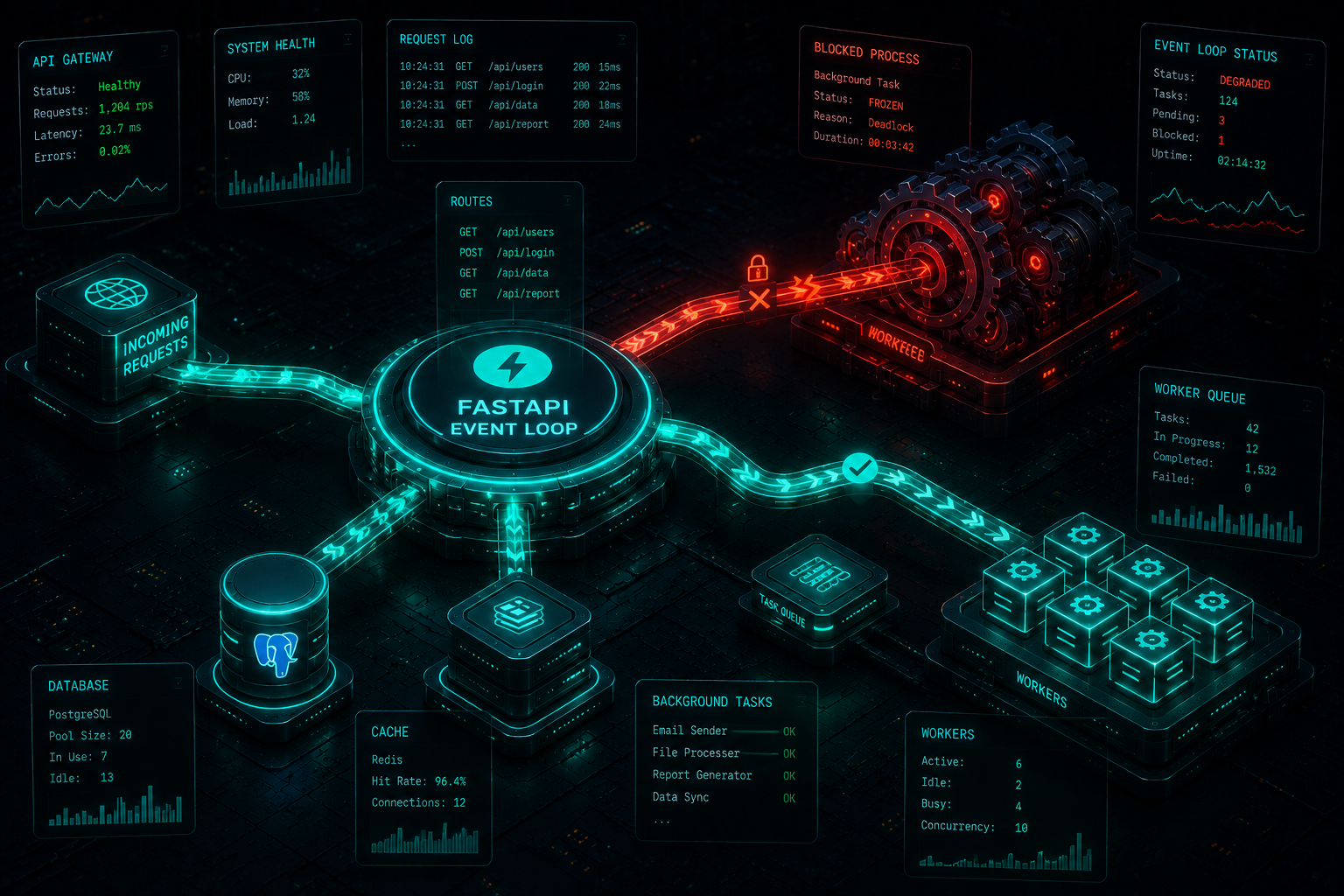
FastAPI has grown into one of the most popular modern web frameworks for building high-performance AI backends and microservices, thanks to its native support for asynchronous programming (async/await) and standard ASGI servers like Uvicorn. However, scaling a high-throughput FastAPI application often exposes a subtle concurrency bottleneck: Event Loop Blocking.
This architectural flaw typically surfaces when developers attempt to execute long-running or computationally heavy processes using FastAPI’s built-in BackgroundTasks class. While BackgroundTasks is highly effective for lightweight operations like sending emails or firing webhooks, misusing it for heavy data crunching can completely freeze your API gateway. Let’s look under the hood of FastAPI’s asynchronous architecture, analyze a production failure scenario, and implement enterprise-grade solutions.
The Concurrency Mechanic: CPU-Bound vs. I/O-Bound Tasks
To understand why your FastAPI server suddenly stops responding to incoming HTTP traffic while running a background execution path, you must understand the difference between how the framework treats CPU-bound and I/O-bound processes:
I/O-Bound Tasks: Operations that spend most of their execution lifespan waiting for network sockets or disk operations (e.g., fetching data from a PostgreSQL database, downloading an image from AWS S3, or requesting an LLM payload from OpenAI). These tasks belong inside an asynchronous ecosystem because they surrender control back to Python’s single-threaded event loop while waiting for the network wire to resolve.
CPU-Bound Tasks: Operations that actively saturate the CPU cores with calculations (e.g., processing images with Pillow, manipulating data tables with Pandas, running local machine learning model inference, or parsing large JSON text files). Because Python utilizes a strict Global Interpreter Lock (GIL), a CPU-bound task running directly inside the event loop thread pool will hijack the execution path, refusing to yield control. As a result, the entire Uvicorn server freezes, causing trailing client connections to time out.
FastAPI’s BackgroundTasks tool executes functions on the same process as your main application. If you pass a synchronous, blocking CPU-heavy function to BackgroundTasks, it directly blocks the main event loop.
The Production Failure Scenario
Consider this broken endpoint that attempts to compress a heavy media file inside a standard background task layout:
# main.py
import time
from fastapi import FastAPI, BackgroundTasks

app = FastAPI()

def blocking_image_compression(file_path: str):
    # CRITICAL FLAW: High CPU consumption process executed synchronously
    # This loop locks the Python process completely, preventing task context switches.
    print(f"Starting heavy processing for {file_path}")
    time.sleep(10) # Simulating an intensive 10-second image conversion matrix
    print("Processing completed")

@app.post("/api/v1/media/process")
async def process_media(file_path: str, background_tasks: BackgroundTasks):
    # The endpoint instantly returns a 202 status code to the user,
    # BUT the background execution immediately hijacks the single event loop.
    background_tasks.add_task(blocking_image_compression, file_path)
    return {"status": "Processing initiated in the background"}

@app.get("/api/v1/health")
async def health_check():
    # While 'blocking_image_compression' runs, this lightweight, independent
    # health check endpoint will hang and time out for all external users.
    return {"status": "healthy"}
Even though /api/v1/media/process instantly offloads the job and returns a response, the moment blocking_image_compression begins execution, the /api/v1/health endpoint becomes completely inaccessible to other clients for 10 full seconds.
Production-Grade Architecture Solutions
Solution 1: Offloading to Thread Pools via run_in_executor
If your backend infrastructure is constrained to a single server instance and you cannot afford external queue managers, you must explicitly push the blocking CPU-bound background logic into a separate OS thread pool using Python’s native asyncio.to_thread or loop.run_in_executor.
# services/optimized_worker.py
import asyncio
import time
from fastapi import FastAPI, BackgroundTasks

app = FastAPI()

def heavy_cpu_task(payload: str):
    # This remains a blocking synchronous execution loop
    time.sleep(10)
    return f"Processed {payload}"

@app.post("/api/v1/compute")
async def run_compute(payload: str):
    # FIX: Pushing the synchronous workload to a separate worker thread.
    # The main async event loop remains 100% responsive to incoming requests.
    loop = asyncio.get_running_loop()

    # Executing in default ThreadPoolExecutor configuration
    asyncio.create_task(loop.run_in_executor(None, heavy_cpu_task, payload))

    return {"status": "Workload safely offloaded to an isolated OS thread"}
Solution 2: Decoupled Distributed Task Queues (Celery + Redis)
For production systems targeting global enterprise scale, relying on internal threading models is a risky design choice. A crash or memory leak in the background thread can instantly bring down your primary API routing process.
The absolute industry standard is to completely decouple the background task layer from the API process using a distributed message broker like Redis combined with a dedicated worker engine like Celery.
# tasks/celery_config.py
from celery import Celery

# Initialize Celery completely isolated from the FastAPI application runtime
celery_app = Celery('tasks', broker='redis://localhost:6379/0', backend='redis://localhost:6379/0')

@celery_app.task
def distributed_cpu_intensive_job(file_path: str):
    # This runs on a separate machine or isolated container completely
    import time
    time.sleep(10)
    return "Task Complete"
Inside your primary FastAPI routing file, you simply trigger the job via Celery’s delay() method. The FastAPI process immediately drops the request context into Redis and moves on, maintaining maximum network throughput.
# api/endpoints.py
from fastapi import FastAPI
from tasks.celery_config import distributed_cpu_intensive_job

app = FastAPI()

@app.post("/api/v1/scale-compute")
async def trigger_enterprise_job(file_path: str):
    # FIX: Zero impact on FastAPI's memory, threads, or event loop.
    # Celery worker process absorbs 100% of the computational friction.
    distributed_cpu_intensive_job.delay(file_path)
    return {"status": "Task successfully queued on distributed architecture"}
Conclusion
Building modern web applications with FastAPI requires keeping the core asynchronous event loop clear of structural blockage. By understanding the boundaries of BackgroundTasks, utilizing thread execution wrappers for internal tasks, and migrating heavy computing jobs to an isolated Celery and Redis broker infrastructure, you safeguard your server gateway and guarantee optimal application runtime reliability.
Resolving MongoDB Cursor Timeouts on Large
Aggregation Pipelines Architectural Optimization click here

2 thoughts on “Eliminating FastAPI Event Loop Blocking inside Background Tasks”